Best Laser Engraving Machines for Plastic: Top Picks for DIY and Small Biz
Choosing the right laser engraver for plastic projects means balancing power, precision, and ease of use. The models below are selected for versatility with plastics like acrylic, PETG, and lightweight polymers, while also delivering solid performance on wood and other materials. Each option combines strong engraving capabilities with beginner-friendly features and practical work areas.
| Product | Brand | Laser Power | Working Area | Notable Feature |
|---|---|---|---|---|
| ACMER S1 (6000mW) | ACMER | 6000 mW | 130×130 mm | High precision and speed |
| ACMER S1 (2500mW Beginner) | ACMER | 2500 mW | 5.1×5.1 in | Compact and portable |
| ACMER S1 (3500mW) | ACMER | 3500 mW | 130×130 mm | Strong all-around performer |
| Carverall K15 Pro 5W | Carverall | 5,000 mW | About 200×300 mm | Real 5W power and broad material support |
| LONGER Ray5 5W | Longer | 5,000 mW | 400×400 mm | High-speed, large work area |
ACMER S1: 6000mW High-Precision Engraver

The ACMER S1 6000mW laser engraver delivers high-precision engraving with a 455±5nm diode laser and a 2mm focal length. With a maximum speed around 10,000 mm/min and a repeatable positioning accuracy near 0.01 mm, it is well-suited for detailed plastic work such as acrylics and other lightweight polymers. Its 130×130 mm working area supports small to mid-scale projects, while its 2-in-1 engraving and cutting capability expands potential applications from signs to indented designs on plastic surfaces. The unit arrives predominantly preassembled, simplifying setup for beginners and enabling rapid project start times. Users should consider ventilation and safety when operating a Class 4 device, and ensure compatible software like LightBurn or LaserGRBL for optimal workflow.
Key features include: 6000 mW diode laser power, 455 nm wavelength, 0.04 mm laser spot, and 2 mm focal length. The integration of high-speed engraving with reliable positioning makes it a strong choice for hobbyists and small shops focusing on plastic materials, while still performing well on wood and other materials.
ACMER S1: Beginner Mini 2500mW Engraver

Designed for newcomers, the ACMER S1 2500mW unit provides a compact, lightweight option with solid engraving capabilities on wood, acrylic, leather, plastic, and more. It supports a range of laser outputs (including 3500mW and 6000mW variants) and offers a typical engraving speed up to 10,000 mm/min with a precise 0.04 x 0.04 mm spot. The 5.1×5.1 inch area accommodates a variety of small to medium plastic projects, from custom tags to decorative pieces. Compatibility with LightBurn and LaserGRBL adds to its versatility for amateur and semi-pro workflows.
This model emphasizes ease of use, with preassembled construction and straightforward setup. It is a practical choice for beginners exploring plastic engraving, while still supporting more ambitious projects as skills improve.
ACMER S1: 3500mW Versatile Engraver

The 3500mW variant of the ACMER S1 offers a balanced power level aimed at reliable engraving and cutting on a broad set of materials, including plastics like acrylic. With a 0.04 x 0.04 mm laser spot and a fast 10,000 mm/min engraving speed, it provides crisp, detailed results for decorative pieces, signage, and small production runs. Its 130×130 mm area remains well-suited to plastic projects of moderate size, while the device’s 2-in-1 capability helps users plan both engraving and cutting tasks. The device ships largely preassembled, supporting quick setup for users expanding into plastic work.
As with other ACMER S1 models, compatibility with LightBurn and LaserGRBL enables a familiar software experience, making it easier to translate designs into precise engravings and cuts on plastic substrates.
ACMER S1: 2500mW Pro-Grade Engraver
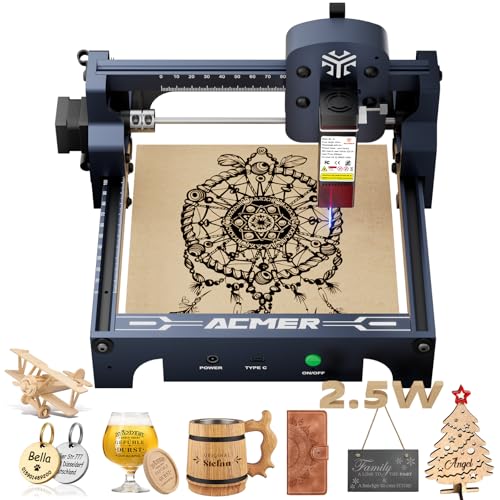
This 2500mW version emphasizes precision and repeatable performance with a 0.04 x 0.04 mm spot and a maximum engraving speed of 10,000 mm/min. Its 130×130 mm working area remains a practical fit for small plastic projects, including intricate text or logo work on acrylic and other plastics. The 2-in-1 engraving and cutting capability enables not only engraving but also light cutting tasks on compatible plastics, wood, and other materials. The unit ships preassembled to minimize setup time, and it remains compatible with popular software tools to suit diverse user preferences.
ACMER S1: Beginner Mini 6000mW (Black)

The 6000mW beginner variant combines high power with simplified operation suitable for hobbyists exploring plastic engraving. The 6000mW output supports detailed engravings on a wide range of plastics and composites, while maintaining a compact footprint for home studios. A 130×130 mm working area, 2 mm focal length, and fast speeds make it a strong option for users who want professional-grade results without a large machine. As with other ACMER S1 models, it emphasizes user-friendly setup and software compatibility to support smooth workflows for plastic projects.
LONGER Ray5: Large-Format 5W Engraver

The LONGER Ray5 5W model offers a large 400×400 mm working area and a 0.08×0.08 mm laser spot, enabling expansive plastic engraving projects, signage, and art pieces. With a claimed engraving speed up to 10,000 mm/min and offline operation via a touch screen, it supports efficient workflows for more extensive plastic production. The device supports Wi-Fi and compatibility with common software ecosystems, allowing flexible setup in studio spaces where plastic items vary in size. This model suits users pursuing bigger plastics projects or those who value a wide working envelope.
Buying Guide: Key Considerations For Plastic Engraving
- Laser power and material compatibility: Higher power helps with clearer engravings on thicker plastics and some coated materials, but may require stronger ventilation and safety measures. Consider models offering adjustable power settings for diverse plastics such as acrylic, PETG, and ABS.
- Engraving area vs. project size: Small to medium plastic projects fit 130×130 mm areas, while larger signs or panels benefit from larger work zones (e.g., 400×400 mm). Choose a size that matches your typical work scale.
- Precision and speed: Look for a laser spot around 0.04 mm for fine text and detailed logos, with speeds up to 10,000 mm/min or higher if you plan frequent fast-turnaround tasks.
- Ease of use and setup: Preassembled units reduce initial setup time. Beginner-friendly features, such as included safety glasses and straightforward software (LightBurn or LaserGRBL compatibility), help shorten the learning curve.
- Software compatibility: Ensure compatibility with widely used programs to simplify design import and workflow. Software versatility is important for custom text, logos, and intricate shapes.
- Safety and compliance: For higher-power units (Class 4), ensure proper ventilation, air filtration, and safety protocols to protect eyes and skin. Consider protective enclosures if available.
- Support for cutting vs. engraving: If you plan occasional cutting of plastics, verify that the unit’s power and focal settings can handle cutting tasks, not just engraving.
- Software and ecosystem: Look for a platform that works with popular tools (LightBurn, LaserGRBL) and offers updates or user communities for troubleshooting and ideas.
- Portability and footprint: Smaller units are easier to relocate and fit into hobbyist setups; larger units may require dedicated workspace but enable bigger projects.
Across these options, buyers should align power, work area, and software compatibility with their typical plastic projects. For beginners, starting with a compact, preassembled model with proven materials support provides a solid path to building expertise before tackling larger or more complex plastic engravings.
Leave a Reply