Best Label Printer for Bottles and Home Organization
Finding a reliable label printer that excels at bottle labeling can simplify pantry tracking, product labeling, and gift organization. This guide highlights five top options designed for bottles, jars, and small business use. Each product listing includes core features, connectivity, and app capabilities to help you pick a model that fits your needs and budget.
Summary of chosen products:
| Product | Brand | Key Features | Connectivity |
|---|---|---|---|
| SUPVAN T50M Pro Bluetooth Label Maker | SUPVAN | 3/4″–2″ wide labels, water-resistant tapes, 40 fonts, 650+ icons | Bluetooth, App |
| KNAON Bluetooth Thermal Shipping Label Printer | KNAON | 4×6 size, 3,000+ templates, 5,000+ icons, 100+ fonts | Bluetooth, USB |
| Rongta Bluetooth Label Maker | Rongta | 2″ wide labels, 203 dpi, battery powered | Bluetooth, USB-C |
| Phomemo D30 Label Maker | Phomemo | Inkless printing, 1000+ symbols, templates, OCR & more | Bluetooth |
| ETIKEZ PM260 Label Maker | ETIKEZ | 2″ label size, 90+ fonts, 450+ materials | Bluetooth, PC app |
SUPVAN T50M Pro Bluetooth Label Maker

The SUPVAN T50M Pro is designed for home and small business labeling, offering 3/4″ to 2″ wide labels suitable for bottles, jars, food containers, and storage boxes. Its primary strength lies in its versatile editing app, which lets users add images from mobile devices and customize labels with 40 fonts, 50 frames, and 650+ icons. Output quality benefits from precise image processing, delivering high-resolution results that enhance readability and aesthetic appeal. The device supports inkless printing, reducing maintenance and ongoing costs. This model is especially useful for labeling pantry items, kitchen jars, and mailers in small office settings, while also accommodating product info, QR codes, and brand logos for small businesses.
Key features include flexible label widths, an accessible app for image insertion, and a broad library of fonts and icons. The combination of inkless printing and high clarity makes it a practical option for bottle labeling where legibility and durability matter. The compact design supports easy storage, and the Bluetooth connection enables wireless operation from a smartphone or tablet, making it convenient for on-the-go labeling tasks.
KNAON Bluetooth Thermal Shipping Label Printer
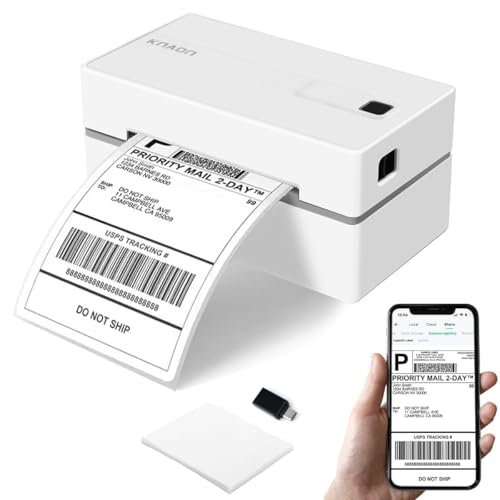
The KNAON shipping label printer emphasizes wireless flexibility and broad template support for professionals and hobbyists. It supports iOS, Android, Windows, Mac, and Chromebook platforms, with integration through the FlashLabel Pro app. While Bluetooth connectivity enables wireless printing, users should note that the device relies on the app for Bluetooth workflows rather than direct device-to-printer pairing. USB connectivity provides an alternative for desktop setups, and a built-in USB drive with drivers supports quick setup on compatible computers. With a library of 3,000+ templates and 5,000+ icons, it suits DIY labeling for bottles, product tags, and shipping labels, making it a strong choice for small retailers labeling inventory and bottles with consistent branding.
For bottle labeling, the emphasis on templates and icons helps create professional-looking labels that can include barcodes or QR codes. The device’s multi-usage nature—from shipping labels to product labeling—makes it adaptable for varying labeling tasks around the home or small business. Its printable sizes accommodate many bottle dimensions, and the app ecosystem can streamline template customization to match branding needs.
SUPVAN T50M Pro Bluetooth Label Maker With Tape

This variant of the SUPVAN T50M Pro emphasizes a robust labeling kit with tape for broader labeling tasks. It shares the same core capabilities—3/4″ to 2″ label widths, 40 fonts, 50 frames, and 650+ icons—while offering the practical option to use tape-embedded labels for moisture-prone environments such as kitchen bottles or pantry jars. The enhanced image processing in the companion app supports crisp lettering and clear iconography, which is helpful when labeling items with small fonts or detailed logos. As with the previous SUPVAN model, wireless operation via Bluetooth makes it convenient to print labels directly from mobile devices, supporting on-the-spot bottle labeling, inventory tracking, and organization projects.
In bottle-centric labeling scenarios, this model’s durability and flexible tape options help create long-lasting labels for bottles in pantries, refrigerators, or display shelves. The combination of inkless printing and high output quality maintains legibility, even on curved bottle surfaces where wraparound labeling is common.
Rongta Bluetooth Label Printer

The Rongta label maker focuses on portability and versatile usage for home, small business, and personal labeling tasks. It supports labels up to 2 inches wide, making it well-suited for bottle labels, storage containers, and product tags. The device emphasizes a compact form factor with a rechargeable battery and Bluetooth connectivity, allowing for on-the-go labeling. The included app provides templates and editing features to tailor labels for different bottle shapes and sizes, ensuring legibility and clean presentation. For bottle labeling, the Rongta model offers a practical blend of mobility and print quality, enabling quick labeling in kitchens, offices, or workshops.
Users should note the device’s emphasis on home and small business labeling, where ease of use and battery life are important. The combination of Bluetooth and USB-C connectivity offers flexible workflow options, whether you are labeling a single bottle or a lineup of products for inventory and branding purposes.
Phomemo D30 Label Maker

The Phomemo D30 is known for inkless, Bluetooth-enabled labeling with support for continuous and fixed-length tapes. Its compact design makes it suitable for bottle labeling, home organization, and classroom labeling projects. The D30 app provides access to a wide array of templates, symbols, fonts, and features like icons, logos, barcodes, QR codes, and images. This model is particularly attractive for users who want to produce colorful or visually distinctive labels using color-patterned tapes while keeping costs low due to inkless printing. The system supports Excel imports, OCR, and voice recognition, expanding its utility for more complex labeling tasks.
For bottle labeling, the inkless technology ensures clean, smudge-free results, which is important for pantry and kitchen use. The app-based workflow allows customizing labels for different bottle types and contents, helping to maintain consistent branding and organization across a household or small business operation.
ETIKEZ PM260 Label Maker

The ETIKEZ PM260 emphasizes ease of use and a rich app ecosystem with templates and presets. It supports iOS, Android, and PC platforms, enabling Bluetooth printing and desktop workflows. With a library offering 90+ fonts, 14+ languages, and 450+ materials, the PM260 is a versatile choice for labeling bottles, kitchen items, and household organization tasks. Its built-in rechargeable battery and auto-shutoff feature help conserve energy during long labeling sessions. This model’s broad compatibility makes it suitable for households and small offices that require flexible labeling solutions across devices and operating systems.
The PM260’s emphasis on templates and varied materials makes it a strong option for bottle labeling where consistent label appearance and material compatibility matter. The app-driven workflow is beneficial for users who want templates that can be quickly adapted to different bottle sizes and branding requirements.
Buying Guide: key considerations for bottle labeling printers
- Label size and durability: If you plan to label bottles, choose a printer that supports 0.75″ to 2″ labels and water- or oil-resistant materials to withstand kitchen or pantry environments.
- Printing technology: Inkless/thermal printing minimizes maintenance and ongoing costs, especially for frequent bottle labeling. Check output resolution (DPI) for crisp text on curved surfaces.
- Connectivity: Bluetooth is common for mobile labeling; USB-C or USB is useful for desktop workflows. Consider whether a device supports multiple operating systems (iOS, Android, Windows, macOS, Chromebook).
- App ecosystem and templates: A robust app with fonts, icons, frames, and templates speeds up design. Look for features like QR codes, barcodes, and image insertion to enhance labeling versatility.
- Battery life: For frequent labeling tasks away from power, a long-lasting rechargeable battery is advantageous. Check stated print hours per charge and charging requirements.
- templates and customization: If bottle labeling requires branding consistency, templates and the ability to save presets help maintain uniformity across multiple bottles or product lines.
- Ease of use: A straightforward setup, quick template access, and reliable feed reduce jams and misprints on round surfaces common to bottles.
- Cost considerations: While initial price matters, factor in ongoing costs such as label tape or specialty labels, app subscriptions, and replacements.
In choosing the best label printer for bottles, prioritize how the device handles curved surfaces, its label materials, and the availability of templates aligned with your labeling goals. For households aiming to organize pantry items, a compact, inkless model with strong app support may be optimal. For small businesses labeling product bottles and packaging, consider printers with larger label widths, robust templates, and reliable connectivity for desktop and mobile workflows. Each of the selected models offers a balanced mix of portability, label versatility, and software support to address these needs.
Leave a Reply