Best CNC Machines for Beginners: Easy Picks for Learning, Engraving, and Small Projects
Starting in CNC machining can be exciting but overwhelming. The following beginner-friendly machines are designed to be easy to set up, affordable to try, and capable of producing real, tangible results on wood, acrylic, and other materials. Each option below balances simplicity with room to grow as your skills improve.
Summary of Selected Products
| Product | Brand | Best For | Key Strength |
|---|---|---|---|
| Masuter Pro 3-Axis CNC Router | FoxAlien | Detailed engraving and versatile materials | All-metal frame; dust-proof controller; multiple spindle options |
| 3018-PROVer V2 CNC Router | SainSmart | Ultimate beginner value with easy assembly | Pre-assembled parts; upgradable accessories; offline potential |
| 4040-PRO CNC Router | Genmitsu | Steadier build for learning basic milling | Steel frame; upgraded electronics; multiple spindle mounts |
| 3018 Desktop CNC Router | OUYANG | Compact starter machine | Precise engraving; broad software compatibility |
| 3018 Pro Max All-M Metal CNC | LUNYEE | Stronger build for metals and plastics | 500W spindle; long Z-axis travel; all-metal |
FoxAlien Masuter Pro 3-Axis CNC Router
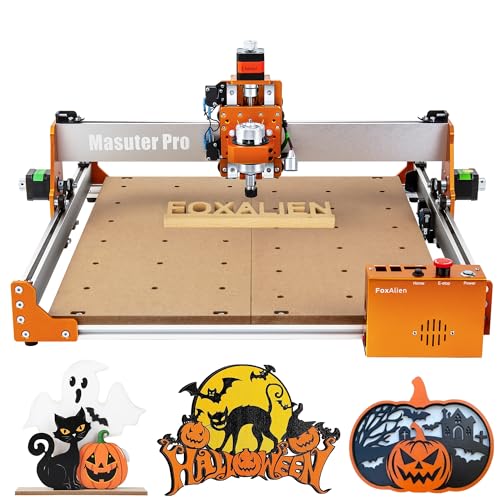
The FoxAlien Masuter Pro is built around an all-metal frame with a linear rail Z-axis that emphasizes stability and precision for hobby engraving and light milling. Its design supports woods, acrylics, MDF, nylon, and similar materials, making it a practical first CNC for beginners. An upgraded dust-proof controller box reduces debris intrusion and simplifies operation, with clearly accessible emergency stop and home functions for safer use. The Masuter Pro ships with compatible spindle options, including 52mm and 65mm clamps, and can be upgraded to higher-power spindles as skills advance. This flexibility makes it suitable for exploratory projects and increasing complexity over time.
Key features include: all-metal construction, enhanced rigidity, dust-resistant control box, and compatibility with multiple spindles. For beginners, the Masuter Pro offers a gentle learning curve with clear upgrade paths, helpful for users who anticipate expanding to heavier cuts or larger workpieces. It’s well-suited to wood, acrylic, and simple composites, making it a strong first CNC for learners who want tangible output quickly.
SainSmart Genmitsu 3018-PROVer V2 CNC Router

The Genmitsu 3018-PROVer V2 is widely regarded as a top entry-level CNC for beginners. It emphasizes value and accessibility, offering a compact footprint and straightforward assembly that typically takes under an hour. The kit supports easy enhancements through optional accessories, including an offline controller and higher-powered spindles, which lets new users scale up their capabilities. The machine is designed for wood, acrylic, and plastic projects, with a focus on simplicity and proven GRBL control. Clear cable management helps keep setups tidy as you learn the basics of CAM workflows and toolpaths.
Pros for newcomers include quick setup, strong community support, and a path toward expanded functionality. Potential users should consider their space, anticipated material types, and whether offline control is a must-have for their workflow. The ProVer V2 remains a dependable starter that can grow with a hobbyist’s evolving needs.
Genmitsu 4040-PRO CNC Router

The 4040-PRO from Genmitsu adds stability and extended capabilities for learning basic milling. It uses a steel HSS frame with dual Y-axis rails and robust lead screw motion to improve rigidity during carving and engraving tasks. The upgraded control box includes a land-based dust-proof design, an emergency stop, and a home function to keep beginners safe while experimenting with different feed rates and depths. The machine ships with multiple spindle mounts (42mm and 52mm) and is compatible with various spindles and even a laser module, offering a clear upgrade path as skills grow.
For newcomers, the 4040-PRO provides a reliable, sturdy platform to practice 3-axis milling and engraving. It’s best suited for learning on wood, acrylic, and soft plastics, with enough headroom to explore more complex projects without leaving the beginner stage.
3018 Desktop CNC Router by OUYANG

The OUYANG 3018 is a compact 3-axis desktop CNC designed for beginners seeking a small, approachable machine. It features a precise engraving capability and is compatible with a wide range of software, enabling users to work with popular CAM programs. The unit’s simple footprint makes it ideal for hobbyists with limited workspace but who still want to produce detailed engravings on wood, acrylic, and plastics. Basic assembly and a straightforward workflow help new users quickly learn toolpath generation and setup.
Potential buyers should assess whether the machine’s size fits their project scope and whether offline or online control aligns with their preferred workflow. OUYANG’s 3018 serves as a solid starter model for learning the essentials of CNC routing and engraving.
LUNYEE 3018 Pro Max All-Metal CNC

The LUNYEE 3018 Pro Max is built for higher durability with a fully all-metal frame and a robust 500W spindle. Its extended Z-axis travel (up to 80mm) and reinforced aluminum profiles provide improved rigidity for more demanding cuts, including metals and dense plastics. The machine emphasizes precision with a linear guide system and a well-engineered work surface. This model is a strong option for beginners who anticipate heavier workloads and want a platform that remains stable under more challenging operations as they grow their skill set.
Considerations for first-time buyers include budget, room for expansion, and the desired material range. The Pro Max offers a clear upgrade path for those planning to tackle more ambitious projects early in their CNC journey.
Buying Guide: Key Purchase Considerations for Beginner CNC Machines
Choosing a CNC machine as a beginner involves balancing immediate usability with future growth potential. Here are essential factors to consider:
- Work area and footprint: Start with a compact unit (roughly 12″ x 12″ to 16″ x 16″) to fit small spaces. Ensure the size matches your typical project dimensions.
- Frame and rigidity: All-metal frames with sturdy Y-axis rails deliver better cutting accuracy and longevity, especially for frequent use.
- Spindle options and power: A lower-power spindle (around 5000–10000 RPM) is suitable for wood and soft plastics; higher power (300W+) enables more demanding tasks but increases cost and noise.
- Control system: Look for GRBL-based controllers for easy software compatibility, and consider offline control if you prefer to work without a PC connected at all times.
- Upgrade path: Begin with a machine that supports additional spindles, larger workpieces, or laser modules to extend capabilities as skills grow.
- Software ecosystem: Ensure compatibility with popular CAM programs and that there is ample documentation and community support.
- Safety features: Emergency stop, dust containment, and proper enclosure or shielding improve safety for new users.
- Budget vs. future needs: While initial models are affordable, plan for accessories (spindles, probe kits, and clamps) that let you expand without a full replacement.
Bottom line: beginners should prioritize a sturdy, upgrade-ready platform with straightforward setup and abundant learning resources. The right balance of ease of use and potential expansion helps new users gain confidence quickly while laying a solid foundation for more complex projects.
Leave a Reply